• email notification not working

  • OpenKM has many interesting features, but requires some configuration process to show its full potential.
OpenKM has many interesting features, but requires some configuration process to show its full potential.
Forum rules: Please, before asking something see the documentation wiki or use the search feature of the forum. And remember we don't have a crystal ball or mental readers, so if you post about an issue tell us which OpenKM are you using and also the browser and operating system version. For more info read How to Report Bugs Effectively.
 #15670  by rasha123
 
hi,

i'm using openkm 5.1.9 , trying to use notification by email but its not working.
all users and email are imported from the active directory.

mail.png
mail.png (11.61 KiB) Viewed 6751 times
but when i check from tool> prefrence> user configuration there was no email there! i trried to add emai and mapd server and test it it gives me OK!. bot still email is not appearing in the email field.
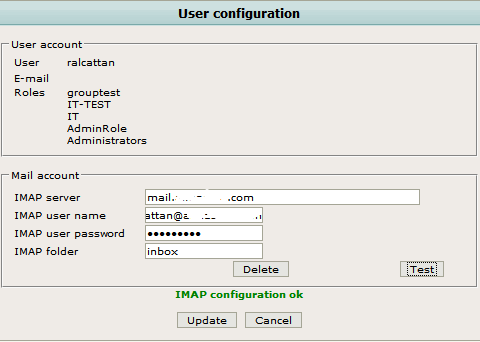
mail1.png
mail1.png (9.82 KiB) Viewed 6751 times
i tried to test it but add file and notify user but nothing came to may email.
this is my configuration in administration

mail3.png
mail3.png (5.25 KiB) Viewed 6751 times
did i miss some thing ??? apprciate the help :)
 #15675  by rasha123
 
now i can recieve notifications to my domain email. but i m really confused about the E-mail feaure in the desktop, am i able send and recieve emails here too and how???
email.png
email.png (15.65 KiB) Viewed 6743 times
email.png
email.png (15.65 KiB) Viewed 6743 times
when i add file and select notify users it comes to my email. but nothing updated here.

this is my configuration for mail-service.xml
Code: Select all
<?xml version="1.0" encoding="UTF-8"?>
<!-- $Id: mail-service.xml 62349 2007-04-15 16:48:15Z dimitris@jboss.org $ -->
<server>
  <!-- ==================================================================== -->
  <!-- Mail Connection Factory                                              -->
  <!-- ==================================================================== -->
  <mbean code="org.jboss.mail.MailService"
         name="jboss:service=Mail">
    <attribute name="JNDIName">java:/Mail</attribute>
    <attribute name="User">openkm@domain.com</attribute>
    <attribute name="Password">pasword</attribute>
    <attribute name="Configuration">
      <!-- A test configuration -->
      <configuration>
        <!-- Change to your mail server prototocol -->
        <property name="mail.store.protocol" value="imap"/>
        <property name="mail.transport.protocol" value="smtp"/>
        <!-- Change to the user who will receive mail  -->
        <property name="mail.user" value="openkm@domain.com"/>
        <!-- Change to the mail server  -->
        <property name="mail.imap.host" value="mail.domain.com"/>
        <!-- Change to the SMTP gateway server -->
        <property name="mail.smtp.host" value="mail.domain.com"/>
<property name="mail.smtp.starttls.enable" value="true" />
      <property name="mail.smtp.socketFactory.class" value="javax.net.ssl.SSLSocketFactory" />
        <!-- The mail server port -->
        <property name="mail.smtp.port" value="587"/>
<property name="mail.smtp.socketFactory.port" value="587" />
        <!-- Change to the address mail will be from  -->
        <property name="mail.from" value="openkm@domain.com"/>
        <!-- Enable debugging output from the javamail classes -->
        <property name="mail.debug" value="false"/>
      </configuration>
    </attribute>
    <depends>jboss:service=Naming</depends>
</mbean>

  <!-- OpenKM -->
  <mbean code="org.jboss.mail.MailService" name="jboss:service=OpenKM">
    <attribute name="JNDIName">java:/mail/OpenKM</attribute>
    <attribute name="User">openkm@domain.com</attribute>
    <attribute name="Password">password</attribute>
    <attribute name="Configuration">
      <configuration>
        <property name="mail.transport.protocol" value="smtp"/>
        <property name="mail.smtp.host" value="mail.domain.com"/>
        <property name="mail.smtp.port" value="587"/>
        <property name="mail.from" value="noreply@openkm.com"/>
        <property name="mail.debug" value="true"/>
      </configuration>
    </attribute>
    <depends>jboss:service=Naming</depends>
  </mbean>
</server>
appreciate the help :)
Attachments
email1.png
email1.png (19.7 KiB) Viewed 6743 times
 #15681  by techexpress
 
I think email directory it's to store mail that you transfer from Outlook
You need to install Add-in in you Office configuration

you can find more information at http://wiki.openkm.com/index.php/Outlook_Addin

Picture attached you can see the mail receive from the forum and upload to Open KM .
default directory are Year, month, day
Attachments
mailview.jpg
mailview.jpg (84.04 KiB) Viewed 6741 times
 #15683  by rasha123
 
hi,

i'm using openoffice and thunder bird for email.

is ther any thunderbird addin for openkm to make it work as outlook addin???
 #16720  by rasha123
 
hi,

i could not find correct addin for thunder bird so i tried to test out look addin.

i used outlook 2007
and i downloaded openkm addon for microsoft office and outlook.
i configured openkm in outlook.
error1.png
error1.png (27.05 KiB) Viewed 6722 times
but i got this error when i try to import email.
error.png
error.png (29.34 KiB) Viewed 6722 times
any idea??? :?
 #16807  by techexpress
 
rasha123 wrote:hi,

i could not find correct addin for thunder bird so i tried to test out look addin.

i used outlook 2007
and i downloaded openkm addon for microsoft office and outlook.
i configured openkm in outlook.
error1.png
but i got this error when i try to import email.
error.png
any idea??? :?
Hi !

you need to put the adress of your OpenKM server , "localhost" it's your PC or ip 127.0.0.1 my OpenKM is virtualised with another adress for exeampl: 192.168.0.5 and my PC with Outlook is 192.168.0.2

About Us

OpenKM is part of the management software. A management software is a program that facilitates the accomplishment of administrative tasks. OpenKM is a document management system that allows you to manage business content and workflow in a more efficient way. Document managers guarantee data protection by establishing information security for business content.